








Hide Desktop Icons
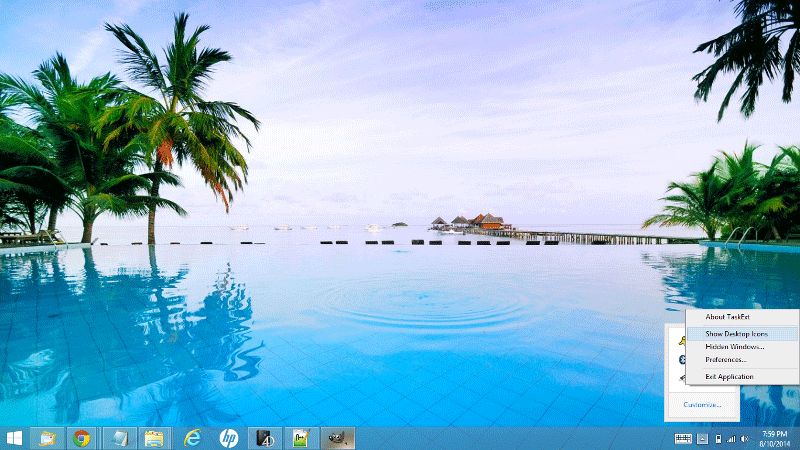
With the unique Hide Desktop Icons feature, you can enjoy your favourite wallpapers without the clutter of desktop icons. The icons are still there, and you can toggle their visibility with just one click.
 Taskbar Extension
Taskbar management made easy!
A freeware taskbar extension for Microsoft Windows. Drag and drop the taskbar buttons on Windows XP, or group your running applications. You can also hide windows or minimize them to the system tray, make them transparent, or keep them always on top.
 Just run itNo installation required
 Clean desktopHide the desktop icons with one click
 Handy extrasNeat extensions for every window
With the unique Hide Desktop Icons feature, you can enjoy your favourite wallpapers without the clutter of desktop icons. The icons are still there, and you can toggle their visibility with just one click.

To keep a window always on top, right click its taskbar button and choose the Always on Top menu option. Repeat the same steps to toggle it off again.

To minimize a running application to the system tray, right click its taskbar button and choose Minimize to Tray. To restore the window, just double click its icon in the system tray.

You can also hide any running application: right click its taskbar button and choose Hide. To see the hidden windows, right click the TaskbarExt system tray icon and choose Hidden Windows....

On Windows XP you can drag and drop the taskbar buttons to rearrange their order. The same technique works for grouped buttons.

On Windows XP you can also control the transparency of your taskbar, so you can see the desktop background image through it.