







Spell-Check Any Page
Check the spelling of the whole page, right in Chrome. Spelling mistakes are underlined in red, just like in your word processor, so you can review the final page the way your visitors will see it.
 Webpage Spell-Check
Catch the typos before your clients do!
Have you ever sent a page to a client with a spelling error or typo? Or are you just cautious and afraid it will happen one day? This small Chrome extension checks the spelling directly on any web page, so you can find and fix the mistakes your HTML editor missed.
Check the spelling of the whole page, right in Chrome. Spelling mistakes are underlined in red, just like in your word processor, so you can review the final page the way your visitors will see it.
Since it uses the Google Chrome spell checker, right-click any underlined word to see suggested corrections, and edit the typo directly on the page to check how the fix reads.
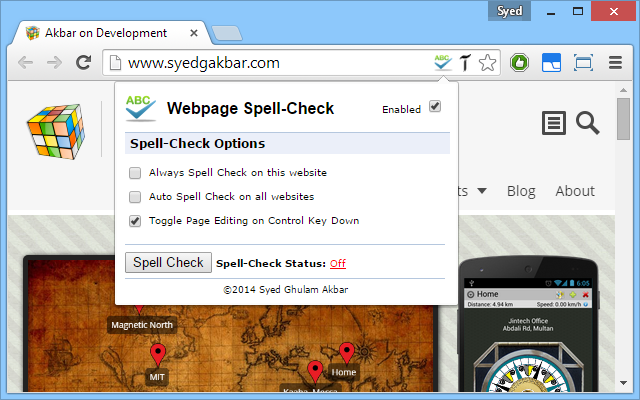
Turn on Always Spell Check on this website for the sites you develop or maintain, or Auto Spell Check on all websites to keep it on everywhere.
Hold down the Ctrl key to toggle page editing on and off, so you can review your fixes quickly and get back to browsing the page normally.
No extra dictionaries to install or keep updated. It uses the spell checker built into Chrome, with the same languages and the words you have already added to your Chrome dictionary.
A single Enabled switch in the extension popup turns it off completely, and the status in the popup always shows whether spell-check is running on the current page.